This morning, I woke up to an email that looked serious at first glance — and you may have received something similar too.
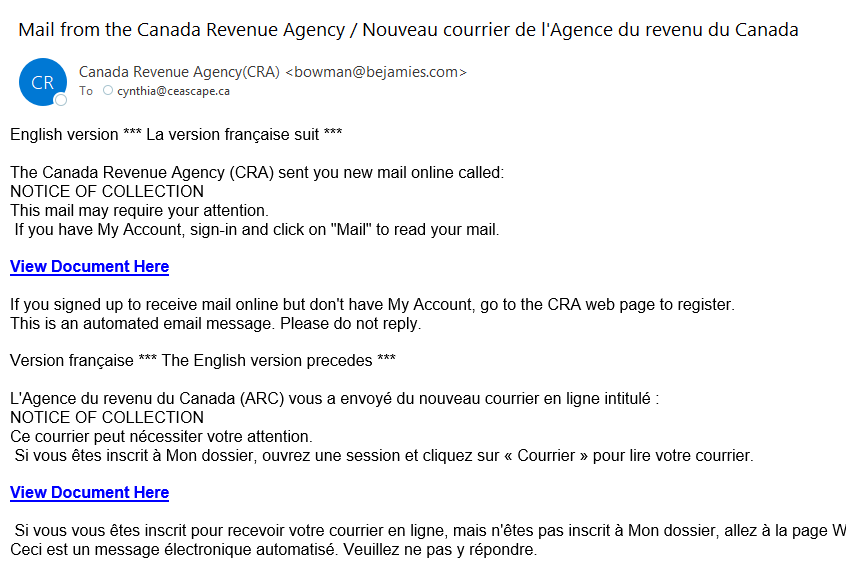
It’s easy to feel a little jolt of panic when an email mentions “collections,” especially when it appears to be connected to the CRA. But this is exactly the moment to pause. Don’t click, don’t reply, and don’t rush into action. Take a breath and look at the details carefully.
My first question was: which client is this supposed to be for? The email didn’t say. My second thought was: it can’t be for me, because I check my CRA accounts regularly. And yes, believe it or not, the government does make mistakes from time to time — shocking, I know.
The next step is to look closely at the sender. Open the email details or headers and check the sender’s address. In this case, the name attached to the message was “Bowman.” Now, I don’t know when Bowman supposedly started working with the CRA, but the CRA emails I’ve seen are not usually sent by someone casually appearing out of nowhere. That alone is a major red flag.
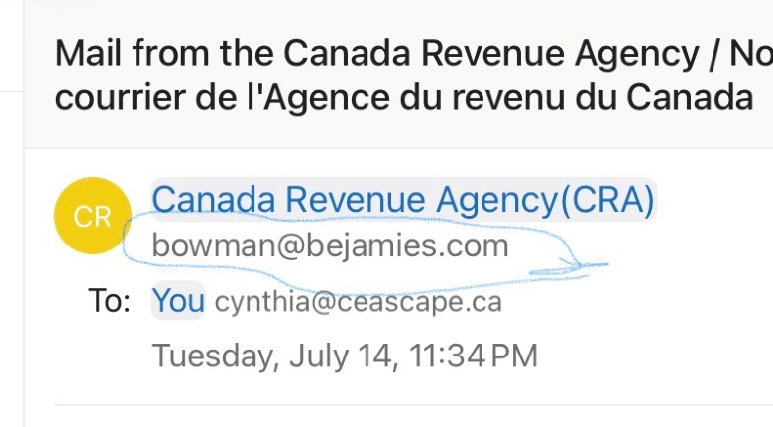
By this time we all should have marked this as spam and blocked it in our email accounts and deleted it.
But maybe you’re bold and want to continue. Maybe you say “so what is that little scammer in foreign country trying to do here?” If you’re tempted to investigate further, please resist that urge. Clicking links in suspicious emails can expose your computer or accounts to real risk.
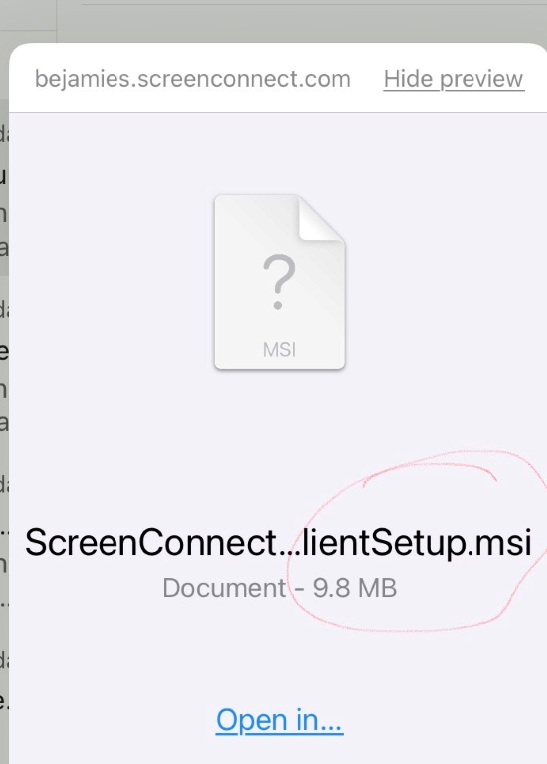
One of the biggest warning signs was the link itself. It led to something involving “ScreenConnect” and a file ending in “.msi.” That type of file can install software on your computer, and you do not want an unknown sender encouraging you to download or run anything — especially before your morning coffee. Look at the extension. “.msi”. What is that, you ask? I already knew but in case you didn’t here is the mantra for a lot of things I don’t know: “Google is my friend”. Hey Google, what’s your take on this? And Google says:

Thanks Google! And thus I hit cancel.
Scams, phishing attempts, and malware are everywhere, and the best protection is a healthy pause and a bit of critical thinking. If you’re tired, distracted, had a lot to drink, or unsure, don’t click anything. Wait until you can look at the message clearly and ask yourself whether it makes sense. If it claims to be from the CRA, log in to your CRA account directly through the official website instead of using a link in the email. And if you still aren’t sure, call or text me and ask about it. Just please don’t forward the suspicious email around or click the link. Bowman, unlike Google, is not your friend.


